Status: public beta — free. ITLunchroom.com is now live in public beta. It is free for individuals, and free for everyone during the beta, with an at-cost option for organizations later.
ITLunchroom teaches the everyday tech and security decisions people actually face at work, in plain English. An unexpected login prompt. An email that feels too urgent. A file you are about to share. The lesson shows you the safer move in a few minutes — no login, no jargon, and no assumption that you work in IT.
Try it yourself
Every claim on this page is checkable in about five minutes, because the whole product is free, public, and open without an account. There is no sign-up wall, no email capture, no trial, and no payment step in front of any of it. Open one of these and see for yourself.
- The vendor-fraud lab — the one in the frames at the top of this page. The lesson page loads as plain HTML and reads in two or three minutes; the Open interactive lesson link at the top of it drops you into the app, where Start the hands-on lab opens the simulation. An email asks you to move a supplier's payment to a new account, and you get a working keypad to check it with. The lab itself is four screens and takes about a minute.
- The MFA prompt lab — a laptop and a phone side by side. You sign in, open the authenticator, read the six-digit code and type it into the laptop — and then meet the prompt that arrives when you did not start one. Two or three minutes.
- The phishing inspection lab — an inbox where one message is pushing hard for your password. You open it and inspect the sender and the link yourself, and the simulation shows you the address behind each one. Two or three minutes.
- The first-office-job page — one of four audience pages, if you would rather see how the lessons get sequenced for a particular person than open a lab.
What you will not be asked for: an account, an email address, or a card. Practice progress is stored in your browser. An account exists, but it is optional and only does one thing — carry your progress to a second device.
How a lesson works
The model is deliberately small: learn the judgment pattern first, then practice it when it helps.
- Pick the safer move. Each lesson is a short, realistic situation with a safe-answer choice — a simulation, not a quiz about definitions.
- Write a short evidence note. You record what you checked and what you would do next, which is what turns a concept into a habit.
- Save it locally. Progress stays in your browser. There is no account to create and nothing to hand over just to start learning.
The free library is 22 short lessons — twelve module lessons, each backed by a hands-on lab, and ten everyday-basics lessons — about five to seven minutes each, plus a few guided paths. The first Starter lesson, getting safely oriented on a workplace device without changing settings or entering information before you know what is on screen, is ready the moment you land.
How a hands-on lab works
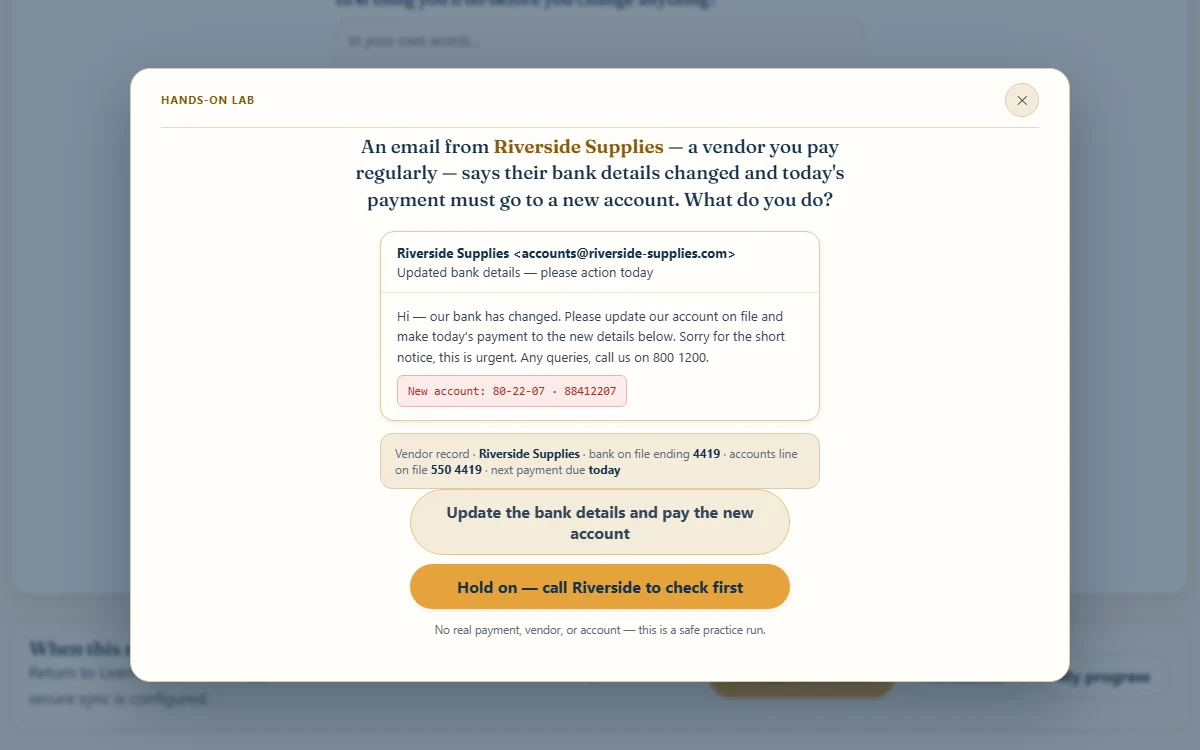
Twelve lessons carry a direct-manipulation lab instead of a question set. The learner operates a simulated device, the simulation plays out the consequence of what they did, and only then does it hand back the safer path. Every lab runs the same four beats. The four frames at the top of this page are one pass through the vendor-fraud lab, captured from the live site.
Setup — the situation, with the evidence already on the table
The first frame is an email from Riverside Supplies, a vendor you pay regularly, saying their bank has changed and today's payment must go to a new account. Directly underneath it sits your own vendor record: bank on file ending 4419, accounts line on file 550 4419, next payment due today. Both phone numbers are on screen — the one the email offered and the one you already had. Nothing is hidden and nothing is a trick. Everything needed to make the right call is visible from the first second, which is exactly how the real version of this moment looks.
Action — the learner operates the device
The second frame is what appears after choosing to call and check: a working keypad with digit keys, a backspace, and a Call button. There is no list of options to pick the correct one from. You dial. The screen keeps the number from your vendor record and the number quoted in the email both in view, and it will let you key in either one.
Consequence — the choice plays out
The third frame is what dialing the email's number gets you: Straight back to the scammer. The number printed in the message loops to the person who sent it, and they will happily confirm their own story. The lab does not stop you before you press Call, and it does not gray out the wrong button. It lets the move complete, then shows you where it landed.
Recovery — the safer path, run for real
The fourth frame is the same scenario after dialing the accounts line off the vendor record: nothing changed, the vendor is baffled because they never sent it, and the account stayed as it was. The takeaway only appears here — after the person has been through both versions — and the lab offers to run again from the top.
The design decision. You cannot learn the feeling of "that looked fine and it wasn't" from a multiple-choice question. A question tests whether someone recognizes the right answer when it is sitting in a list beside three wrong ones, and that is not the shape of the real moment, where nothing is labelled and the wrong move looks exactly like the right one until after it is made. So the lab lets the wrong move happen, in a place where it costs nothing, and shows the consequence. The recovery beat carries the same weight: the thing people actually need is not "do not get fooled", it is "here is what you do instead", and that only sticks if they run it themselves.
- Real devices, not lists. Across the twelve labs the learner drives a phone dialer, a share dialog with per-recipient permissions and column-level choices, an address bar that has to be read before anything is typed into the page behind it, an inbox with sender and link inspection, an authenticator app and code entry, a QR poster, a public Wi-Fi picker and captive-portal gate, and a screenshot about to be shared.
- Every path is playable. Each scenario has both a success and a failure route, and both are reachable. Approving the sign-in you did not start, or emailing the file to the wrong Jordan Smith, plays out on screen rather than being blocked.
- Accessible by construction. Labs open in a lightbox that is a real dialog:
role="dialog",aria-modal, labelled by the lesson title, focus managed, and every control a real button. Lessons without a hands-on lab fall back to the older question-and-answer practice. - Certificates as completion records. Finishing a path issues a self-issued completion record — not a compliance credential and not an accreditation — that can be shared from a server-rendered page. Its visibility is owner-controlled and its identifier is unguessable, so a certificate can be shown without exposing anyone else's.
Real practice, not abstract rules
Lessons attach to tools you actually recognize — your browser, an authenticator app, text-message codes — so practice feels like your real sign-in life instead of a generic policy slide. And every lesson carries the same scope discipline: use only the tools, accounts, storage, and support channels your organization approves. The goal is safer judgment, not clever workarounds.
Free for individuals, configurable for teams
Public lessons explain the judgment pattern without requiring a job, a login, or any organization setup — that part is free, for anyone, and it is the part that is finished. The team lane is the direction, not a shipped product: today it is a client-side scaffold for assigning and tracking the same plain-English content, and it is not an enterprise learning-management system. Individuals stay free; organizations are at cost, and free during the beta.
Why it is built this way
Most security training fails the same way: jargon-heavy, fear-based, and disconnected from the small decisions where people actually get caught. ITLunchroom treats each of those moments as a decision under uncertainty — show the pattern, let the person choose the safer move, and have them write down their reasoning. It is the same operating belief behind the rest of my work: judgment that survives real use beats a slide deck someone clicks through once.
Build notes
The product is a hash-routed vanilla-JavaScript application built with Vite and served by a Cloudflare Worker, with a Supabase Edge Function behind it for signed-in learners. The engineering is small on purpose and guarded at every edge.
- A host-guarded Worker and a publish guard. The Worker answers only for the production hostname and returns 404 to any other host. A publish-guard script statically asserts that the Worker configuration, the deploy script, and the Worker source cannot drift to another domain or route, and CI runs it first: guard the publish target, validate the curriculum, run the unit tests, build, smoke-test the Worker, then fail if any tracked file drifted from the build.
- Auth proxied through the Worker. The sign-in provider's frontend API is proxied under a first-party path by the Worker, which injects the proxy headers and fails closed with a 503 when its secret is absent — a case the tests cover explicitly. Security headers are applied at the edge; the Content Security Policy ships in report-only mode while it is tightened against the live auth flow, and is not yet claimed as enforcing.
- An Edge Function that verifies tokens itself. Progress sync, lead capture, consent events, and certificate issuance run in a Supabase Edge Function that performs manual RS256 JWT verification with WebCrypto against a cached JWKS — checking issuer, authorized party, expiry, and not-before — then scopes every query to the caller. Writable fields are allowlisted, per-field size caps are enforced, and the field rules are unit-tested.
- Progress merges instead of clobbering. Signing in on a second device merges browser-local progress with the synced copy — union for completed sets, latest-write-wins for drafts — so nobody loses work by logging in. The split is not arbitrary: a finished lesson is a fact that only ever gets added, so a union of the two copies cannot be wrong, while an evidence note is a value being edited, where a union would splice two versions into nonsense and the later write has to win.
- One blueprint, 31 public URLs. A build script derives the public lesson pages — 12 module lessons, 10 everyday-basics lessons (article-style), 4 audience landing pages, and the about, privacy, and terms pages — from the same curriculum blueprint the app renders, emitting Course, Article, FAQPage, BreadcrumbList, and ItemList structured data, a stable content-reviewed
lastmod, Open Graph images,llms.txt, robots rules, and the sitemap. A post-deploy step pings IndexNow without ever failing the deploy. It has to run after the deploy because IndexNow proves ownership by fetching a key file from the live site, and it exits zero on every error because the sitemap is the durable record — the ping only buys earlier notice, so a refused hint should never fail a deploy of content that is already correct and published. - Consent done regionally. Analytics run under Consent Mode v2 with region-based defaults — denied in the EEA, UK, and Switzerland until the visitor chooses, granted elsewhere — with the choice persisted locally and an immutable consent-events record for signed-in learners.
My role
- Product concept, positioning, and curriculum design.
- The lesson model: judgment pattern, then simulation, then evidence note.
- The privacy and scope boundaries — browser-local progress, no required login, and "approved tools only" framing.
- Build, writing, and ongoing product direction.
What stays private
ITLunchroom never exposes employer systems, customer data, credentials, internal diagrams, or sensitive incidents. The public value is in the pattern — the safer move — not in revealing anyone's environment. Learner practice stays in the browser unless an organization opts into secure sync.
Related
ITLunchroom is the IT-and-security sibling to AILunchroom.com and sits alongside the broader Technical Operations and IT Documentation frame and the site's security posture. Its "show the safer move under uncertainty" approach echoes the decision-quality thinking in the Market Intelligence Field Notes, and the Runbook Composer is the operator-side tool for writing the procedures those lessons rehearse.
Flight log
- 2026 Q2Development starts months after AI Lunchroom — the realization: if every skill level is going to use AI, every skill level needs a real path to modern computer use first.
- 2026 Q2Labs join every lesson. Practice against mock MFA prompts and phishing emails, because it is not safe to assume anyone has seen one before.
- 2026 Q2Free with no login. The knowledge is globally useful and a login wall adds nothing for the reader — accounts stay optional for progress, notes, and team personalization.
- 2026-06Public beta. First users are friends, colleagues, and the general public.
- 2026-06Hands-on labs replace Q&A practice: twelve direct-manipulation device simulations — dial a number, inspect an address bar, configure a share dialog — with branching outcomes and recovery.
- 2026-07Discovery and growth pass: ten everyday-basics lessons, four audience landing pages, and a journey audit that removed navigation dead ends; the public site is 31 generated URLs.
- nowPublic beta, free. Certificates are self-issued completion records shared from a server-rendered page.